

Choosing software that meets today’s bookkeeping needs is relatively easy. Choosing a platform that will still work after you add customers, employees, transactions, locations, and reporting requirements is harder.
The best accounting software for a growing business should solve today’s problems without forcing an expensive migration a year or two from now. This guide explains how to evaluate scalable accounting software and compares five widely used options: QuickBooks Online, Xero, Wave, Zoho Books, and FreshBooks.
Scope and disclosure
Scope: This guide primarily evaluates U.S. versions of these products. Plan names, pricing, payroll, banking connections, tax features, and availability can differ by country. Product details change frequently, so confirm current terms with the provider before purchasing.
Affiliate disclosure: Some links on IntegriBooks may be affiliate links. If you purchase through an affiliate link, IntegriBooks may earn a commission at no additional cost to you. Compensation does not determine our recommendations, and “best” always refers to the strongest fit for the stated use case—not a universal winner.
How these products were assessed
This comparison is based on current provider documentation and a desk review of the factors that tend to create friction as a business grows. It is not a substitute for testing each platform with your own workflows. The assessment considers:
- Upgrade paths, user access, role-based permissions, and approval controls
- Automation, reporting, budgeting, project and location tracking
- Inventory, multicurrency, integrations, and API availability
- Data export, auditability, security features, and multi-entity limitations
- The likely total cost after payroll, payments, add-ons, implementation, and training
In this article, “best” means the strongest fit for a stated use case—not a universal winner.

1. Start with your business requirements
Before comparing products, define what the software actually needs to do. Separate each requirement into must-have now, likely to need within two or three years, and nice-to-have.
- Business model: Service, e-commerce, retail, consulting, subscription, construction, nonprofit, or product-based?
- Users and controls: Who needs access, and which duties must remain separated?
- Volume: How many invoices, bills, expenses, payments, and bank transactions occur each month?
- Inventory: Is simple quantity tracking enough, or will you need purchase orders, multiple warehouses, serial or batch tracking?
- Payroll: Will payroll be built in or connected through another provider?
- International activity: Will you invoice customers, pay suppliers, or report in multiple currencies?
- Integrations: Which banks, payment processors, ecommerce tools, POS systems, CRMs, and expense applications must connect?
- Entities and tax: Will you need multiple legal entities, consolidated reporting, sales-tax nexus support, or industry-specific compliance?
- Data portability: Can you export transactions, reports, attachments, and audit history in usable formats?
2. Look for capabilities that scale
A long feature list does not make software scalable. The real question is whether the platform can handle more complexity without creating substantially more manual work.
Permissions and approvals
As more people touch the books, implement role-based access, approval workflows, and clearseparation between bill creation, approval, and payment.
Automation
Recurring invoices, payment reminders, bank feeds, transaction matching, rules, receipt capture, and automated categorization can keep transaction volume manageable as it grows.
Inventory
Product businesses should look beyond on-hand quantity. Future requirements may include purchase orders, reorder points, multiple warehouses, landed costs, serial or batch tracking, shipping, and e-commerce connections.
Multicurrency
If international expansion is realistic, confirm whether full multicurrency accounting is available, which plan includes it, and whether you can change existing base-currency settings later.
Reporting
Growing companies often need budgets, cash-flow forecasts, project profitability, departmental or location reporting, custom fields, and KPI dashboards—not only a profit-and-loss statement and balance sheet.
Integrations and API access
Confirm that the platform connects with the systems you use today and offers enough integration or API flexibility for a more sophisticated technology stack.
Security and auditability
Check multifactor authentication, audit logs, backups, access reviews, and the ability to trace who created, changed, approved, or paid a transaction.
Know when you are approaching the ERP threshold
Small-business accounting platforms can struggle with multiple legal entities, consolidated reporting, complex revenue recognition, advanced procurement, or extensive warehouse operations. If those needs are already visible, compare the cost of add-ons and workarounds with an entry-level ERP rather than assuming another subscription tier will be enough.
3. Choose the deployment model that creates the least friction
Cloud accounting is usually the more flexible choice for a growing small business because it supports remote access, collaboration, automatic updates, bank connections, integrations, mobile access, and relatively simple user expansion.
Desktop software still has legitimate uses when a business needs specialized functionality, locally installed systems, greater control over an operating environment, or support for a legacy workflow. The useful question is not simply “cloud or desktop?” It is: which deployment model will create the least operational friction as the company grows?
4. Calculate the real cost of growth
The advertised subscription price is only one part of the cost. Price the configuration you expect to need in two years, including:
- The appropriate higher-tier plan and any additional-user charges
- Payroll, payment-processing, receipt-capture, inventory, ecommerce, and reporting add-ons
- Additional entities, consolidation tools, storage, transaction limits, and API limits
- Migration, implementation, cleanup, training, and ongoing bookkeeping support
- The staff time required for manual workarounds or spreadsheet-based reporting
Promotional prices can obscure the long-term cost. Compare the regular subscription price and confirm whether features are included, optional, or restricted by the plan.
5. Test usability and support
During a trial or guided demo, test real workflows instead of browsing the dashboard. Ask an employee who will use the system to complete the same test.
- Create and send an invoice, then record a payment.
- Enter an expense and attach a receipt.
- Import and reconcile sample bank transactions.
- Generate and customize a profit-and-loss report.
- Add a user and restrict that person’s permissions.
- Connect an application you already use.
- Export transactions and reports in usable formats.
- Find an answer in the help center and identify how live support works.
A slightly more expensive platform that employees can use confidently may cost less than software that requires constant troubleshooting and workarounds.
Accounting software comparison for growing businesses
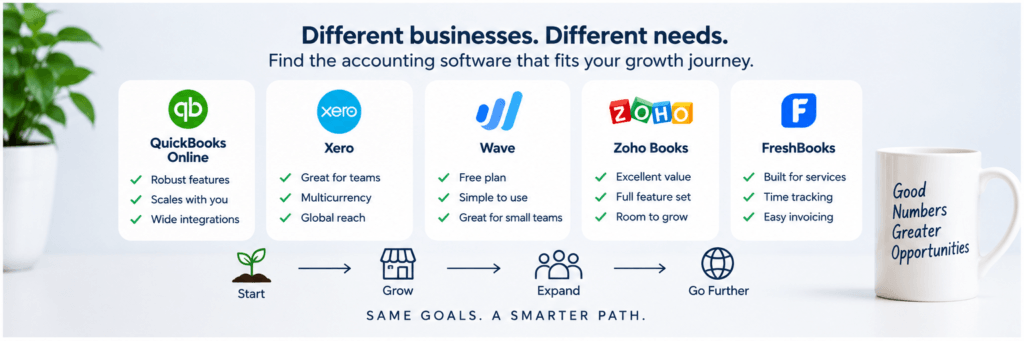
There is no universal winner. Different platforms suit different growth paths.
Platform notes
Wave: a practical starting point for simple businesses
Wave’s Starter plan can work well for freelancers and very small businesses that need basic bookkeeping and invoicing without a monthly subscription. As of the August 2026 review, Wave’s U.S. pricing page lists Pro at $19 per month and includes automatic bank imports, automatic transaction categorization, broader user roles, and receipt capture. Some features are available to Starter users as paid add-ons.
Best fit: freelancers, solopreneurs, and simple businesses that value a low entry cost. Main caution: businesses expecting sophisticated inventory, reporting, permissions, or operational integrations may outgrow it.
QuickBooks Online: a broad option for growing U.S. businesses
QuickBooks Online offers a large U.S. accounting ecosystem and a meaningful progression of capabilities. Inventory and project profitability are associated with higher plans, while custom roles, custom fields, and workflow automation are features of QuickBooks Online Advanced. This distinction matters: do not assume every QuickBooks Online subscription includes Advanced-level controls.
Best fit: U.S. small businesses that expect more complex accounting, inventory, projects, integrations, or reporting. Main caution: evaluate the regular price—not only temporary promotions—and include payroll, payments, additional services, and the plan required for each feature.
Xero: strong for collaboration and international ambitions
Xero is worth considering when several people need access or international activity is likely. Its U.S. pricing materials advertise no per-user license fees for the accounting plans, although subscription and add-on charges still apply. Multicurrency and other advanced functions depend on the plan, so verify which U.S. plans support each requirement.
Best fit: collaborative teams and businesses with international ambitions. Main caution: confirm U.S. banking, payroll, tax, support, and plan-specific functionality rather than relying on information from another region.
Zoho Books: a value-oriented upgrade path
Zoho Books offers an extensive plan ladder and is particularly attractive to businesses already using Zoho applications. Depending on the selected plan and requirements, it can support multicurrency, automation, inventory-related workflows, and broader business integrations.
Best fit: cost-conscious businesses that want room to expand, especially within the Zoho ecosystem. Main caution: determine whether advanced inventory, warehouse management, e-commerce, or analytics is included in Books or requires Zoho Inventory, Zoho Analytics, another integration, or a bundle.
FreshBooks: focused on service businesses and client billing
FreshBooks emphasizes invoicing, time tracking, expenses, estimates, and project-related workflows. That focus can appeal to consultants, agencies, freelancers, and other client-service businesses.
Best fit: businesses that organize work around clients, billable time, projects, and invoices. Main caution: businesses expecting sophisticated inventory, multi-entity reporting, or advanced accounting controls should compare its capabilities carefully with more accounting- or inventory-focused platforms.
How to make the final choice
Use three questions to narrow the field:
- What do we need today? Identify the workflows that consume the most time or cause the most errors.
- What will change? Consider people, locations, volume, inventory, international activity, reporting, controls, and integrations.
- What will that future configuration cost? Price the required plan, users, payroll, payments, add-ons, implementation, and ongoing support.
Then test two or three finalists in the same real-world scenarios and record where each product requires a higher plan, an add-on, a manual workaround, or anoutside application.
Frequently asked questions
What is the best accounting software for a startup?
For simple bookkeeping on a tight budget, Wave can be a practical starting point. Zoho Books offers a strong, value-focused upgrade path. QuickBooks Online may suit a U.S. startup expecting more complex accounting, while Xero deserves consideration when collaboration or international activity matters. The right answer depends on the business model and the plan required for the necessary features.
What should a growing business prioritize?
Prioritize upgrade paths, integrations, permissions, audit history, automation, reporting, data export, and a predictable total cost. Please also confirm the transaction, user, customer, storage, entity, and API limits. A long integration list does not compensate for weak controls or difficult data extraction.
Is free accounting software good enough?
It can be. A free plan may serve a freelancer or new business with straightforward bookkeeping. The risk appears when growth requires inventory, advanced permissions, sophisticated reporting, payroll, automation, multicurrency, or several users. Evaluate the likely upgrade cost before committing years of financial history to a platform.
Should I choose QuickBooks Online or Xero?
QuickBooks Online often appeals to U.S. businesses seeking a broad domestic accounting ecosystem and increasingly advanced functionality. Xero can be particularly attractive when collaboration and international activity matter. Compare the exact plans, integrations, accountant familiarity, support options, and workflows your business needs rather than choosing based on brand recognition alone.
Final evaluation checklist
- Define current requirements and likely needs for the next two to three years.
- Identify essential bank, payment, payroll, e-commerce, CRM, POS, and expense integrations.
- Compare the regular price of the plan you will eventually need.
- Include user, payroll, payment, receipt, inventory, reporting, and add-on costs.
- Test two or three platforms using the same real workflows.
- Evaluate permissions, approvals, audit logs, multifactor authentication, and backup practices.
- Confirm reporting dimensions, budgets, forecasts, project profitability, and data exports.
- Check transaction, customer, invoice, storage, entity, and API limits.
- Confirm migration assistance, training resources, and live support availability.
- Determine whether multi-entity or consolidated reporting will be required.
- Identify the point at which an ERP may cost less than add-ons and workarounds.
Choose for tomorrow, not only today
The best accounting software isn’t necessarily the cheapest platform or the one with the longest feature list. It is the one that fits the business today while leaving enough room to grow without unnecessary complexity or an expensive migration.
For a very small business, Wave may be a Good Fit. A service business may prefer FreshBooks. Zoho Books offers a compelling value-oriented path; Xero is attractive for collaboration and international ambitions; and QuickBooks Online remains a broad option for growing U.S. businesses. None is automatically the right choice at every plan level.
Before committing, compare the features you will need tomorrow, test the workflows that matter, and calculate the full cost of the future configuration.
Need help narrowing the options? Contact IntegriBooks to discuss your business model, bookkeeping workflow, and growth plans.
Sources and verification links
Wave pricing and plan comparison | QuickBooks Online plans | QuickBooks Online Advanced custom roles and workflows | Xero U.S. pricing plans | Zoho Books U.S. pricing | FreshBooks pricing
Product terms, promotional offers, pricing, and availability can change without notice. Recheck every plan-specific statement immediately before publication and periodically thereafter.